Use Langflow in OpenRAG
OpenRAG includes a built-in Langflow instance for creating and managing functional application workflows called flows. In a flow, the individual workflow steps are represented by components that are connected together to form a complete process.
OpenRAG includes several built-in flows:
- The OpenRAG OpenSearch Agent flow powers the Chat feature in OpenRAG.
- The OpenSearch Ingestion and OpenSearch URL Ingestion flows process documents and web content for storage in your OpenSearch knowledge base.
- The OpenRAG OpenSearch Nudges flow provides optional contextual suggestions in the OpenRAG Chat.
You can customize these flows and create your own flows using OpenRAG's embedded Langflow visual editor.
Inspect and modify flows
All OpenRAG flows are designed to be modular, performant, and provider-agnostic.
To view and modify a flow in OpenRAG, click Settings. From here, you can manage cloud storage connectors, model providers, and common parameters for the Agent and Knowledge Ingestion flows.
To further explore and edit flows, click Edit in Langflow to launch the embedded Langflow visual editor where you can fully customize the flow to suit your use case.
After you click Edit in Langflow, you can access and edit all of OpenRAG's built-in flows from the Langflow editor's Projects page. You can also create your own flows.
To edit any flow, you must first unlock the flow.
If you edit any flows other than the Agent or Knowledge Ingestion flows, it is recommended that you export the flows before editing so you can revert them to their original state if needed.
For example, the following steps explain how to edit the built-in Agent flow, which is the OpenRAG OpenSearch Agent flow used for the OpenRAG Chat:
-
In OpenRAG, click Settings, and then find the Agent section.
-
To change the active language model or agent instructions, edit those fields directly on the Settings page. Language model changes are saved automatically. To apply new instructions, click Save Agent Instructions.
-
To add a new language model, edit the model provider settings or configure an additional provider on the Settings page, and then select the new model in the Agent section.
infoOn the Settings page, you can add, edit, and remove model providers.
OpenRAG functionality requires at least one language model and one embedding model. If there are no models available, most OpenRAG functionality will fail until you reconfigure one model of each type.
If you remove providers or models that you previously used for chat or ingestion, you might experience errors or unexpected behaviors. For more information, see Best practices for multiple embedding models.
-
To edit all flow settings and components with full customization capabilities, edit the flow in the Langflow visual editor:
-
Click Edit in Langflow to launch the Langflow visual editor in a new browser tab.
-
If prompted to acknowledge that you are entering Langflow, click Proceed.
-
If Langflow requests login information, enter the
LANGFLOW_SUPERUSERandLANGFLOW_SUPERUSER_PASSWORDfrom your OpenRAG.envfile. -
In the Langflow header, click Starter Project to go to the Langflow Projects page, and then unlock the flow.
-
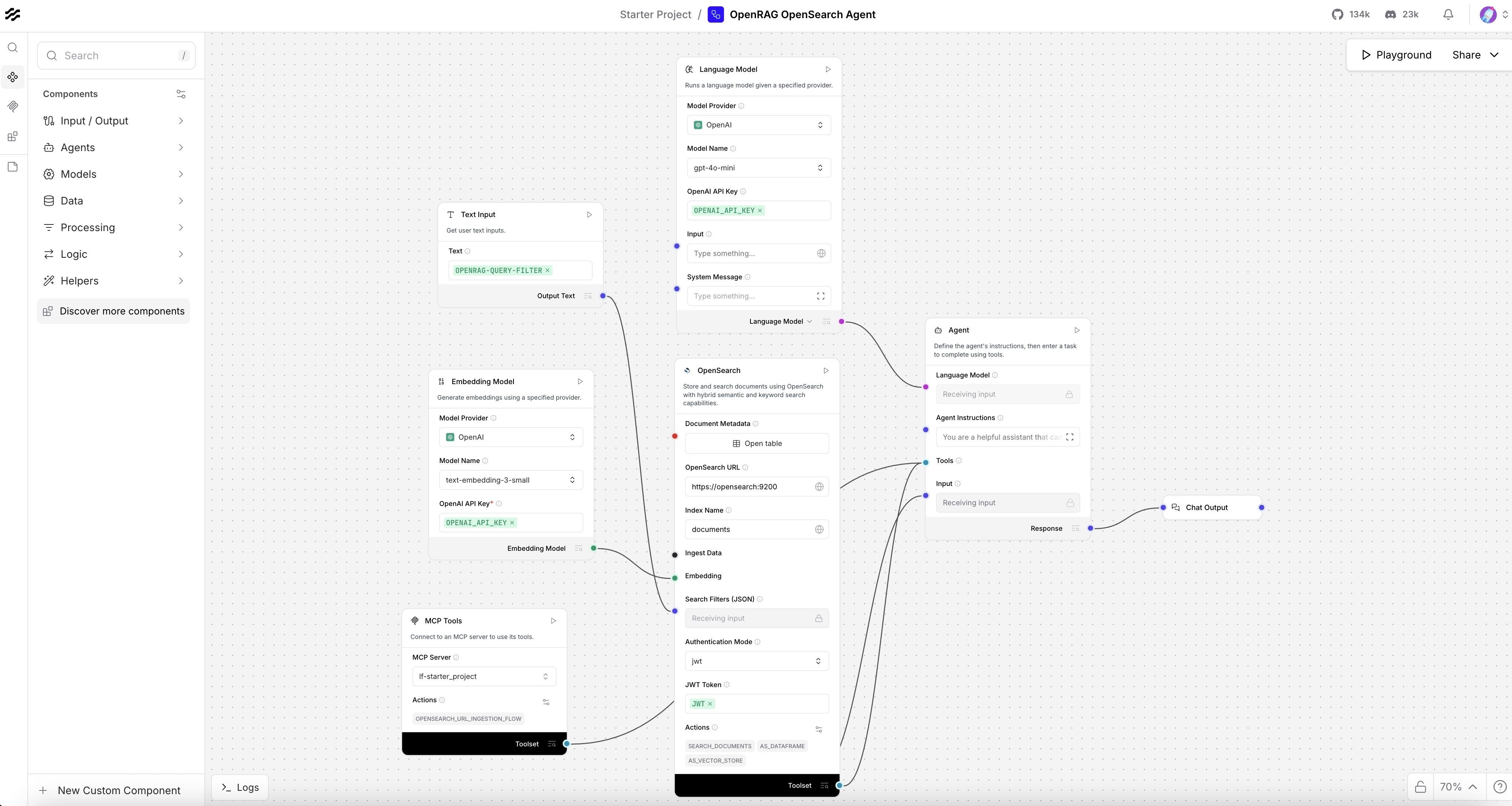
On the Projects page, click the OpenRAG OpenSearch Agent flow to open the visual editor with the flow unlocked.
-
Modify the flow as desired, and then press Command+S (Ctrl+S) to save your changes. Then, you can close the Langflow browser tab, or leave it open if you want to continue experimenting with the flow editor.
-
-
After you modify any Agent flow settings, go to the OpenRAG Chat, and then click Start new conversation in the Conversations list. This ensures that the chat doesn't persist any context from the previous conversation with the original flow settings.
Revert a built-in flow to its original configuration
After you edit the Agent or Knowledge Ingestion built-in flows, you can click Restore flow on the Settings page to revert either flow to its original state when you first installed OpenRAG. This is a destructive action that discards all customizations to the flow.
This option isn't available for other built-in flows such as the Nudges flow. To restore these flows to their original state, you must reimport the flow from a backup (if you exported one before editing), or reset or reinstall OpenRAG.
Build custom flows and use other Langflow functionality
In addition to OpenRAG's built-in flows, all Langflow features are available through OpenRAG, including the ability to create your own flows and popular extensibility features such as the following:
- Create custom components.
- Integrate with many third-party services through bundles.
- Use MCP clients and MCP servers, and serve flows as MCP tools for your agentic flows.
Explore the Langflow documentation to learn more about the Langflow platform, features, and visual editor.
Modify a flow at runtime
You can use tweaks to modify flow settings at runtime without permanently changing the flow's configuration. Tweaks are one-time parameter modifications that are passed to specific Langflow components during flow execution. For more information on tweaks, see the Langflow documentation on Input schema (tweaks).
Set the Langflow version
By default, OpenRAG is pinned to the latest Langflow Docker image for stability.
If necessary, you can set a specific Langflow version with the LANGFLOW_VERSION environment variable. However, there are risks to changing this setting:
-
The Langflow documentation describes the functionality present in the latest release of the Langflow OSS Python package. If your
LANGFLOW_VERSIONis different, the Langflow documentation might not align with the features and default settings in your OpenRAG installation. -
Components might break, including components in OpenRAG's built-in flows.
-
Default settings and behaviors might change causing unexpected results when OpenRAG expects a newer default.